BlinkSnapper BlinkSnapper
0117
Field Assistant · v1.2.5

Your workday,
on autopilot.

The operating system for fiber's front line — every terminal, every ONT, every dollar, in one app.

→ begin · Esc overview · F fullscreen
The hidden cost

Every shift, a tech loses

0+ min
While this slide has been open, a 500-tech fleet lost $0.00 to it.
The turn

What if the job
ran itself?

One app that finds the fiber, reads the labels, files the work, and pays attention to the money — so the tech doesn't have to.

It finds the fiber

Terminal and hub located in seconds — not 10–30 minutes of circling.

It speaks the customer's language

Live AI translation at the door — jobs that would be cancelled get done, and done better.

It tells the customer when

Live ETA link + SMS tracking — the customer prepares for the visit, the tech never dials a number.

It files the paperwork

Serials scanned, Penguin filled, statuses pushed — codes never recalled from memory.

Terminal Locator
Terminal Locator

Find fiber
in seconds.

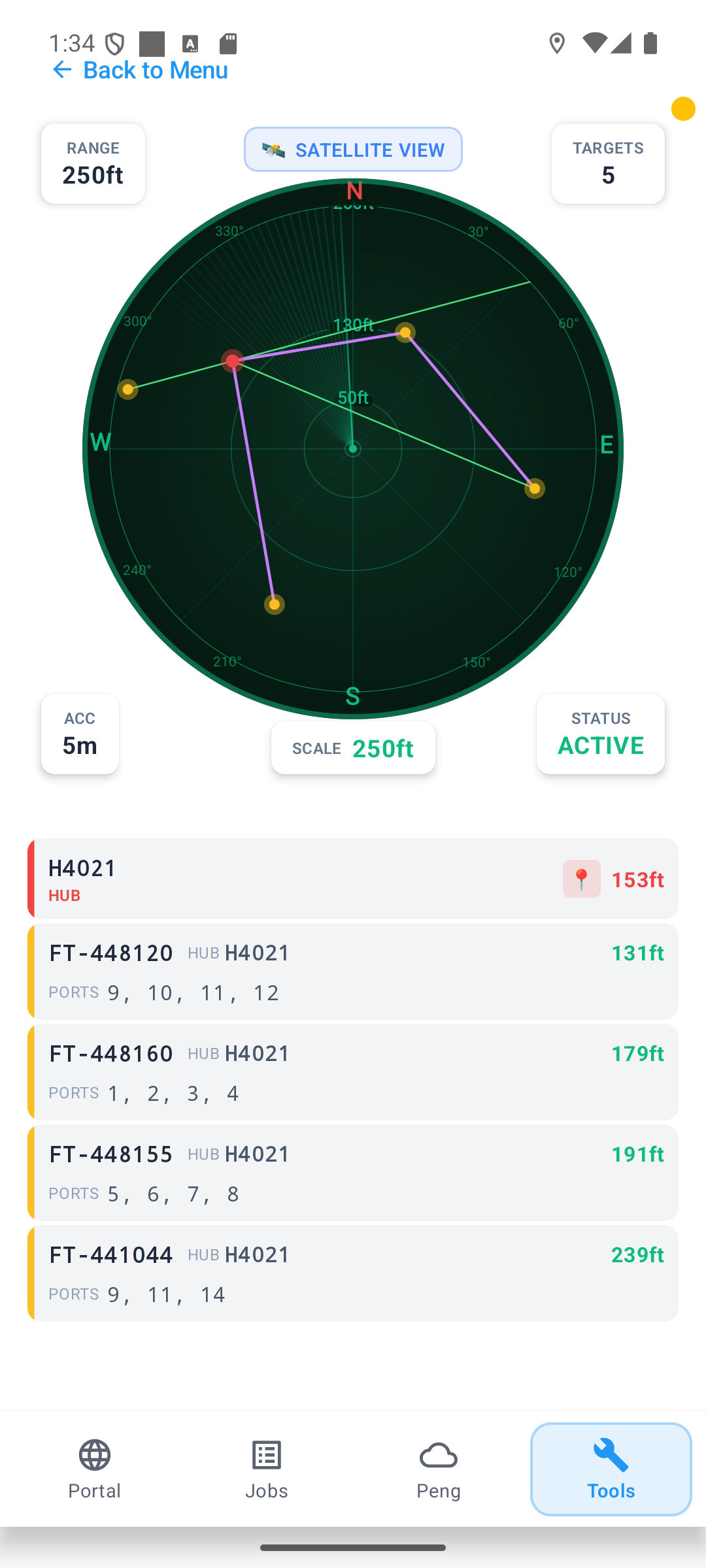
A live, pinch-to-zoom map of every hub, terminal, cable and duct around you — in map, satellite or radar view.
  • Ports without the pole — every terminal shows its port list, so the tech knows what's inside before climbing up or opening the lid.
  • Satellite & radar modes — swap views with a tap, zoom with two fingers.
  • Crowd-corrected pins — hub or terminal in the wrong spot? Send a move request. Once it's fixed, no tech ever wastes time hunting for it again.
  • Works offline — the morning prefetch covers no-signal sites.
< 3 sec to locatesatellite · radaroffline-first
Barcode Scanner
✓ FTRO92815504 · XGS-ONT captured
Barcode + OCR

Scan once.
Done.

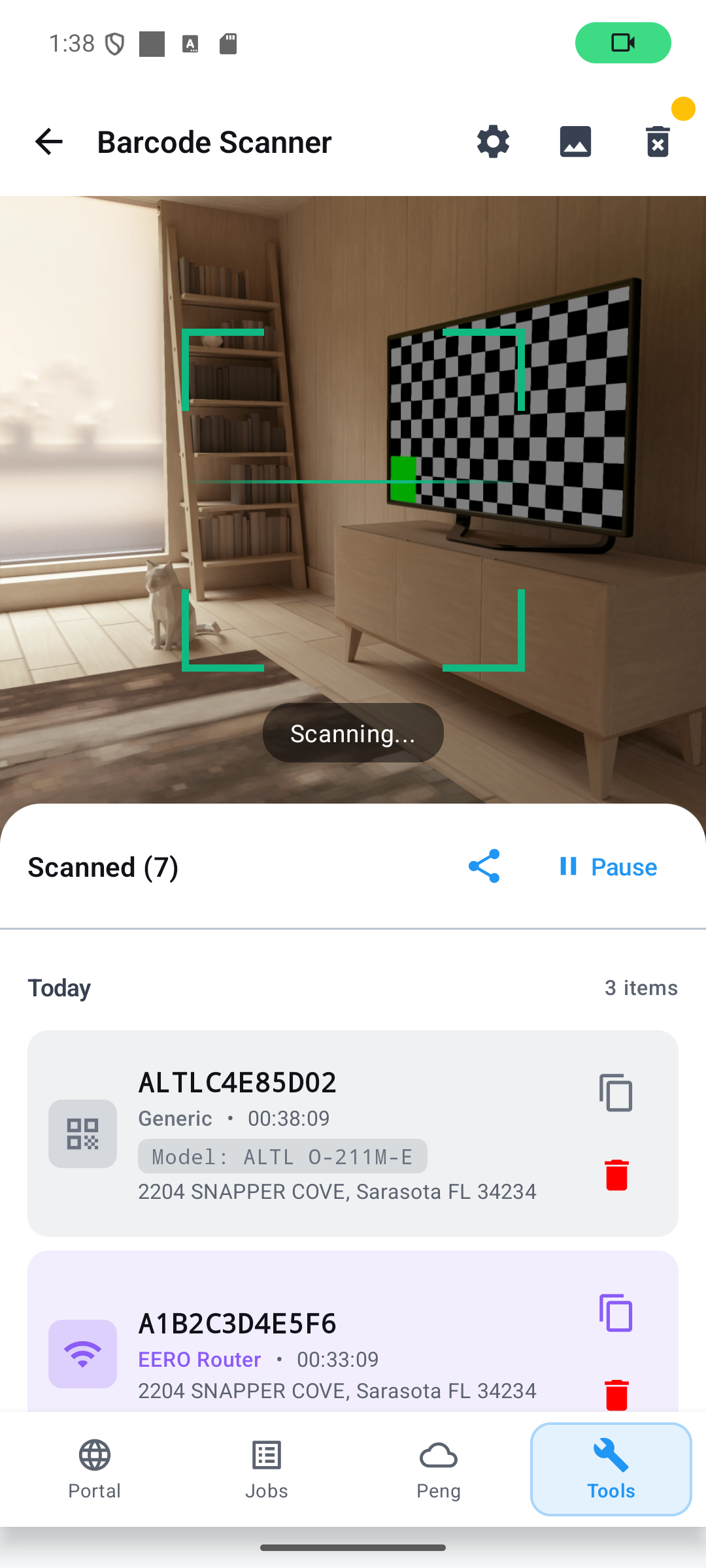
The scanner reads the ONT serial and its printed model in one frame — and rejects junk serials before they ever reach a form.
  • Smart capture — serial + model OCR, with a filter that throws out bogus serials automatically.
  • Address on every scan — the current job address lands in the log, so you always know what was scanned where.
  • Straight into action — jump from the scanner right into ONT install or removal.
  • Batch eero — scan three eeros in a row and install them all at once.
  • Text export — dump the scan history as plain text for warehouse counts and equipment tracking.
junk-serial filteraddress logbatch installtext export
Earnings · tracked automatically

Watch the money
add up.

$0
this month — totals by year, month, week and day.
Built from job data saved for every workday — stored only with the tech's consent.
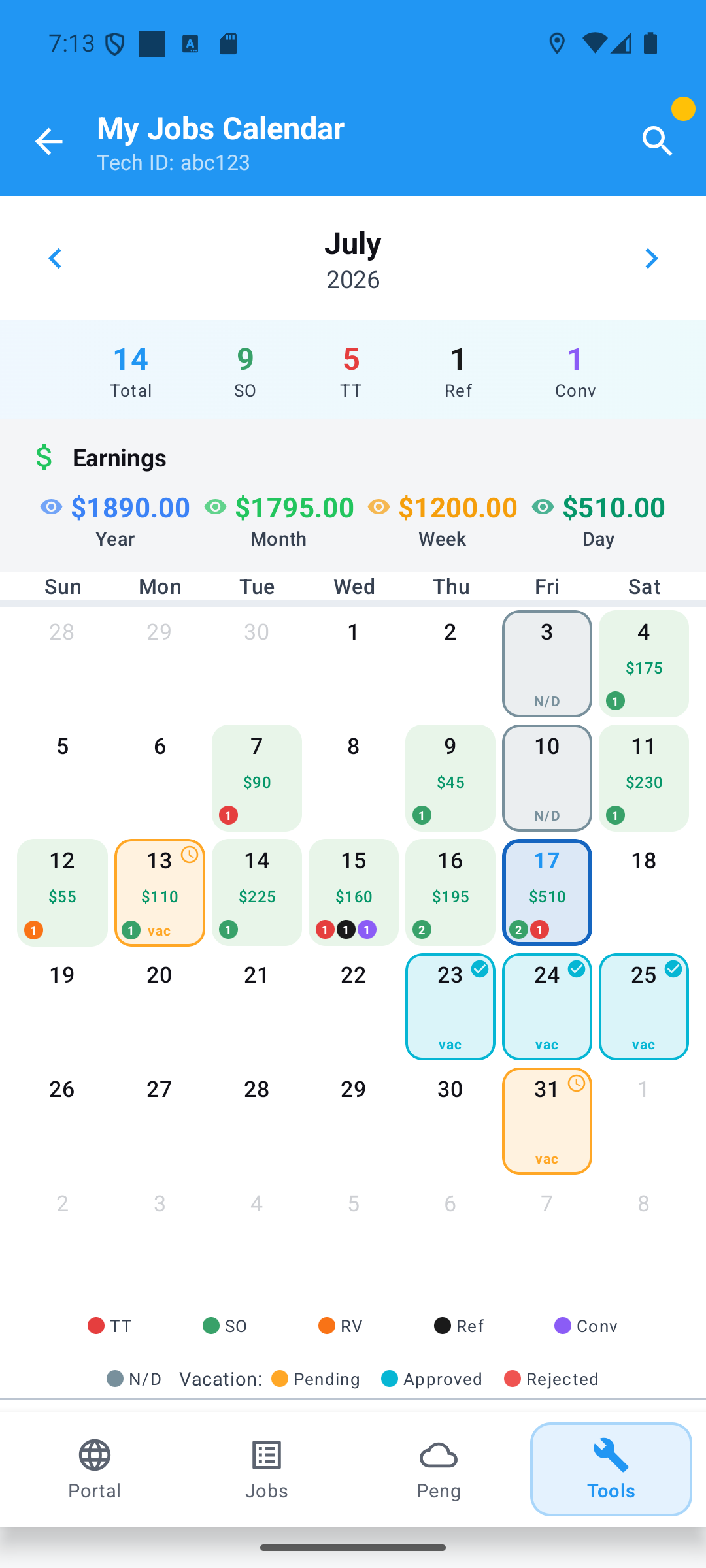
  • One glance, whole story — color-coded days: service order, trouble ticket, converted, return visit, referred.
  • ND days & vacations on the same grid — approved time off and pending requests, visible at a glance.
  • Smart search — find any job by job number, house number or customer phone.
  • Every order kept — full job data stays in the calendar, ready for the next return visit.
  • Private by default — hide earnings with one tap; the calendar keeps working without them.
code-priced+$37k / yryear · month · week · day
Earnings
Jobs
Jobs · Work Status

The whole job,
on one screen.

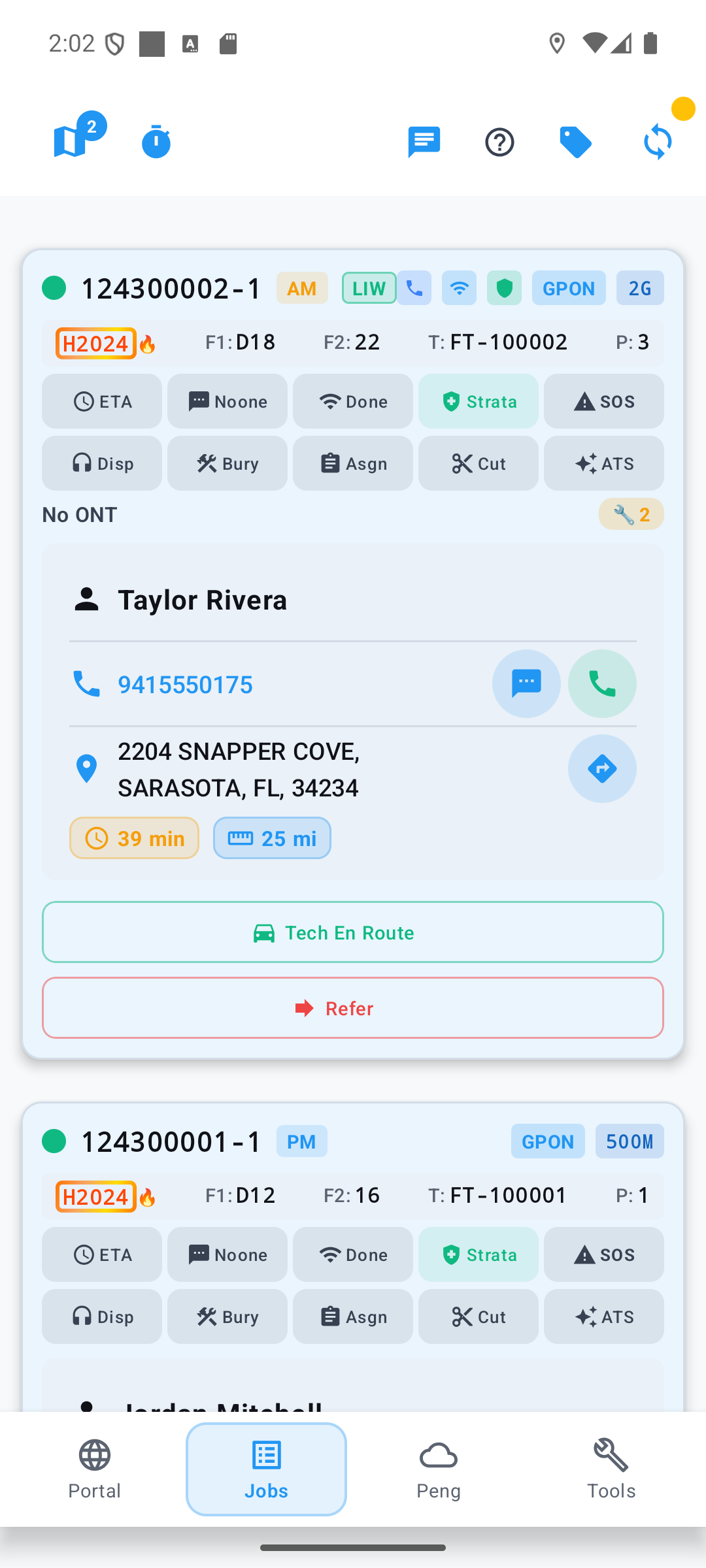
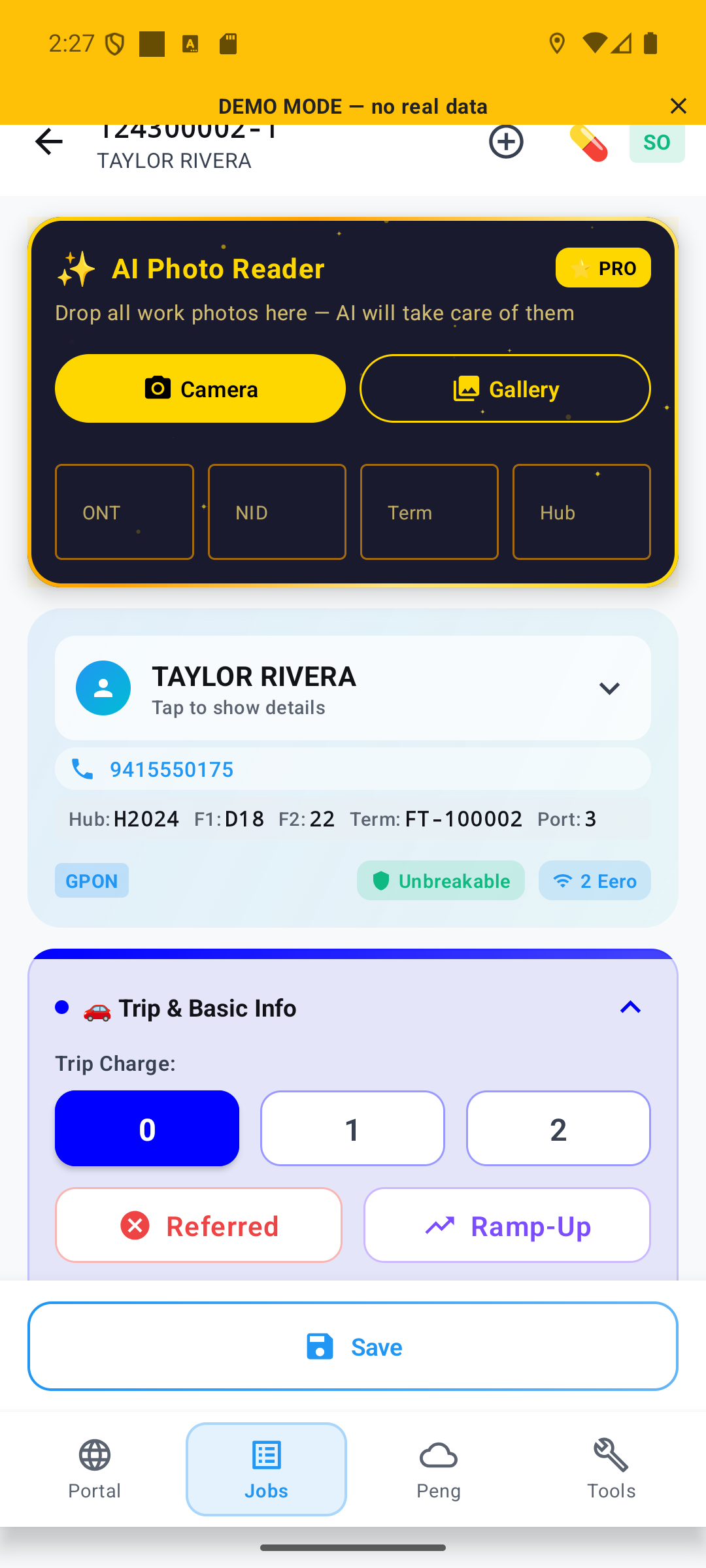
No more digging through endless menus — every fact a tech needs is already in the palm of the hand.
  • Nothing forgotten — missed the bury-cable ticket? A red triangle lists every skipped item.
  • 🔥
    Hubs on fire — same hub on two jobs is highlighted: one trip, several customers connected. No more driving back and forth.
  • ONT at a glance — the current ONT on the job tells you what to expect before you arrive.
  • One-tap call & SMS — dial codes pre-filled from your account. You just talk.
  • Auto-call ETA — optional: the system calls the customer, and on approval texts them the tracking link itself.
  • StrataCare button — trouble on site? One tap, no phonebook digging.
  • SOS
    SOS — alerts nearby techs and the manager; optional auto-911 that hands dispatch your location.
  • Aa
    NATO panel — hold the customer's name for the NATO alphabet + key details, ready for ATS, Assignments or Cutwriters calls.
GPON 2GMTPN syncopt-in history
Conexa · template source
↕ scroll — full template
Report Templates · the flagship

Reports that
write themselves.

The final job report comes out exactly the way your vendor wants it — and when the vendor changes the rules, you change the template once. Every next job follows instantly.

  • Real logic inside — %IF / %ELSE% / %ENDIF% with comparisons and nesting, computed from 60+ live job variables.
  • Import & export — no template skills? Start with the default, or import a friend's proven template in one tap.
  • Employer rules, always — compliance is automatic: what the rulebook says is what the report says.
ConexaStarTek60+ variablesIF / ELSEimport · export
Voice Translator
AI Voice Translator

Speak every
customer's language.

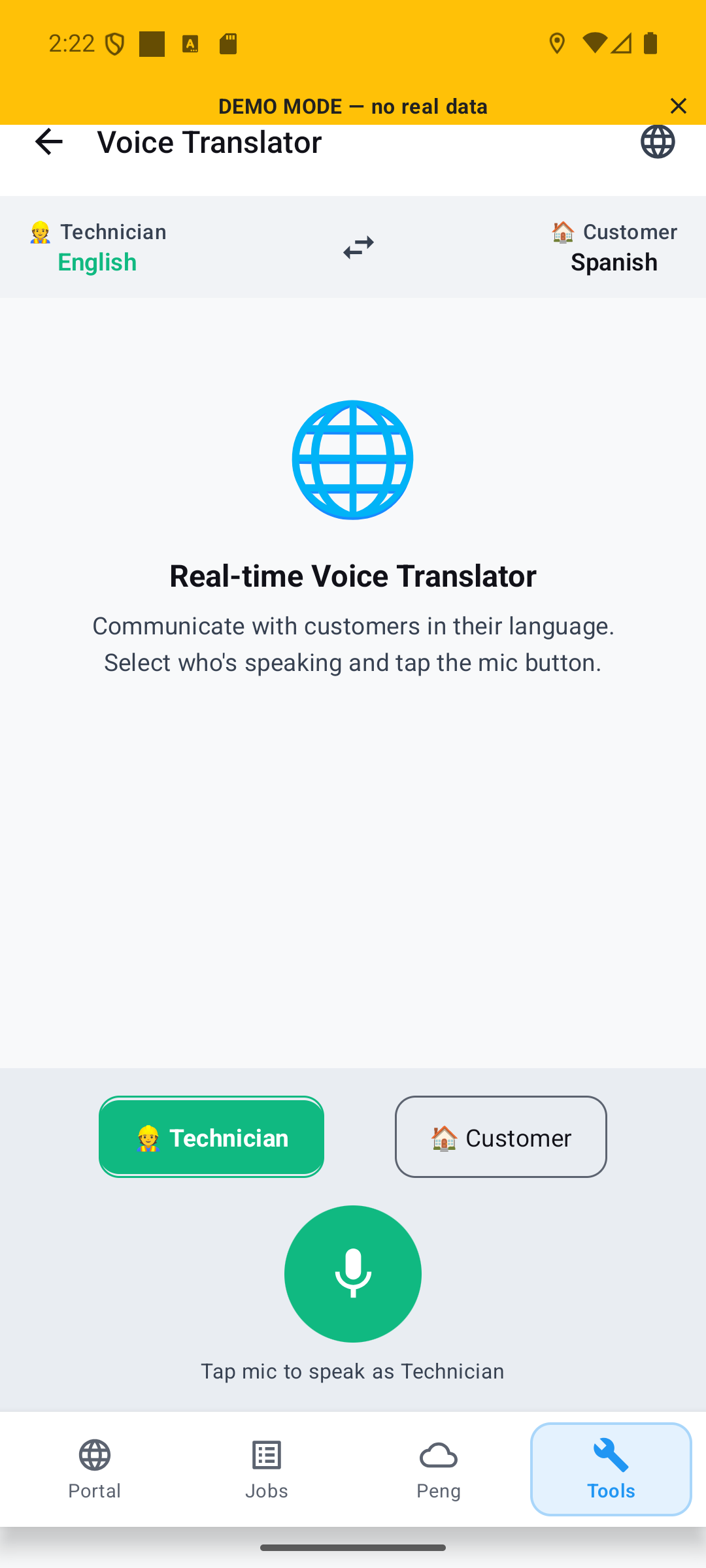
Real-time, two-way voice translation on the doorstep — pick who's speaking, tap the mic, and keep going until you stop.
  • Two-way — tech ↔ customer, 50+ languages.
  • 🎙
    Continuous capture — never cuts off mid-sentence.
  • Live transcript — every exchange also shown as text, and any phrase can be replayed on demand.
  • Nothing stored — conversations aren't saved; export a transcript only if you need it for safety.
EN
ES
EN ↔ ES50+ languages
WiFi Analyzer
WiFi Analyzer

See every
dead zone.

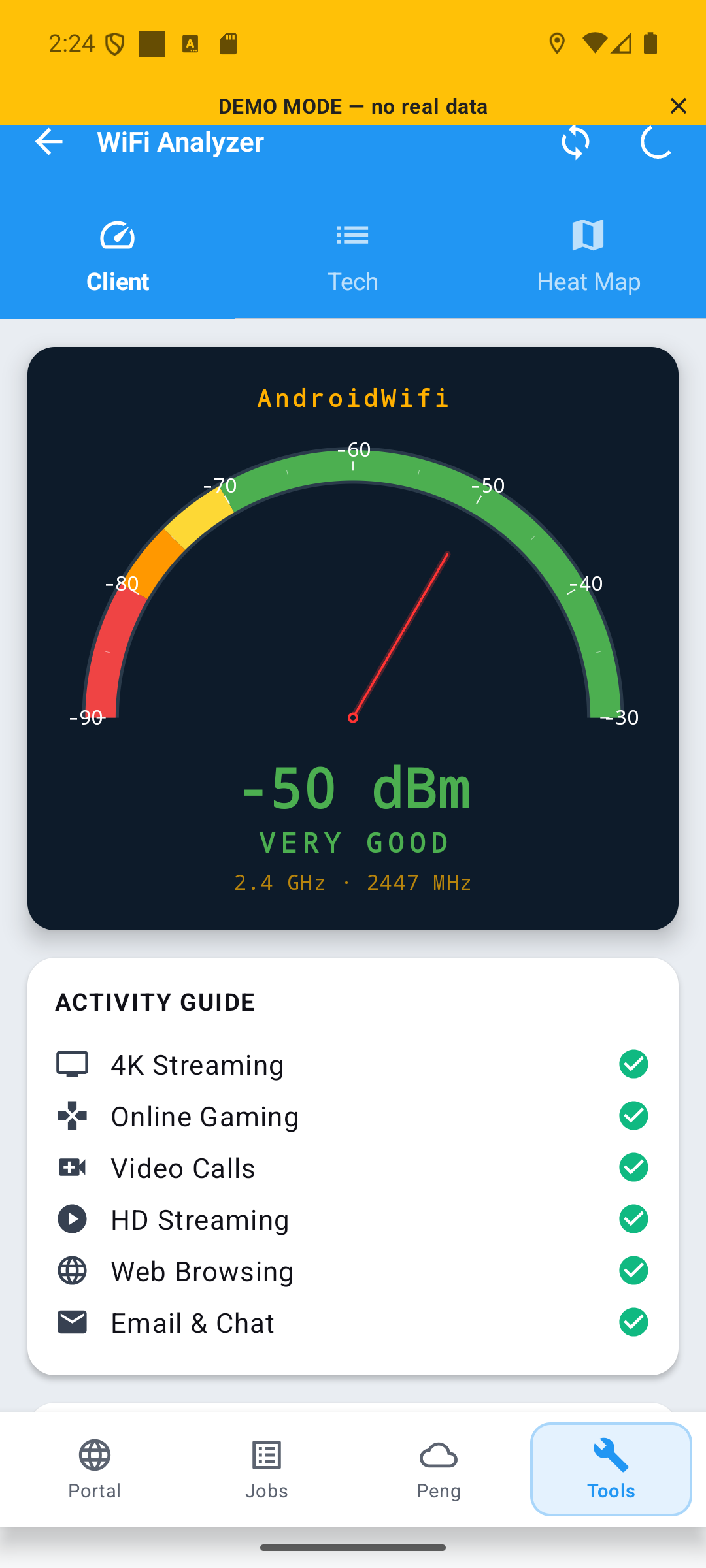
Three modes for three audiences — a traffic-light view for the customer, full spectrum for the tech, and a heat-map report that proves it.
  • Customer mode — a simple traffic-light gauge anyone understands at a glance.
  • Tech mode — every frequency, channel and spectrum, band by band.
  • Heat-map evidence — walk the home and attach the map to the job: exact spot, signal level, steps and distance walked. Proof, not opinion.
  • 🔓
    No password needed — measure link quality even without WiFi credentials (slower, but it works).
ClientTechHeat Mapattach as proof
AI Photo Reader
AI Photo Reader · the crown jewel

Point. Read.
Continue.

The AI does all the grunt work. Drop the job photos in — they sort themselves. And the moment a meter appears in frame, its screen is read for you.
  • Sorts every photo — ONT, NID, terminal, hub — snapped or imported, filed automatically.
  • Reads the meter for you — sees a meter in the shot, reads its screen and drops the real values straight into the job.
  • Seconds, live — it all happens in real time, on screen, while you watch.
AI photosmeter OCRreal-time
ONT Operations
ONT Operations

Total control
of every ONT.

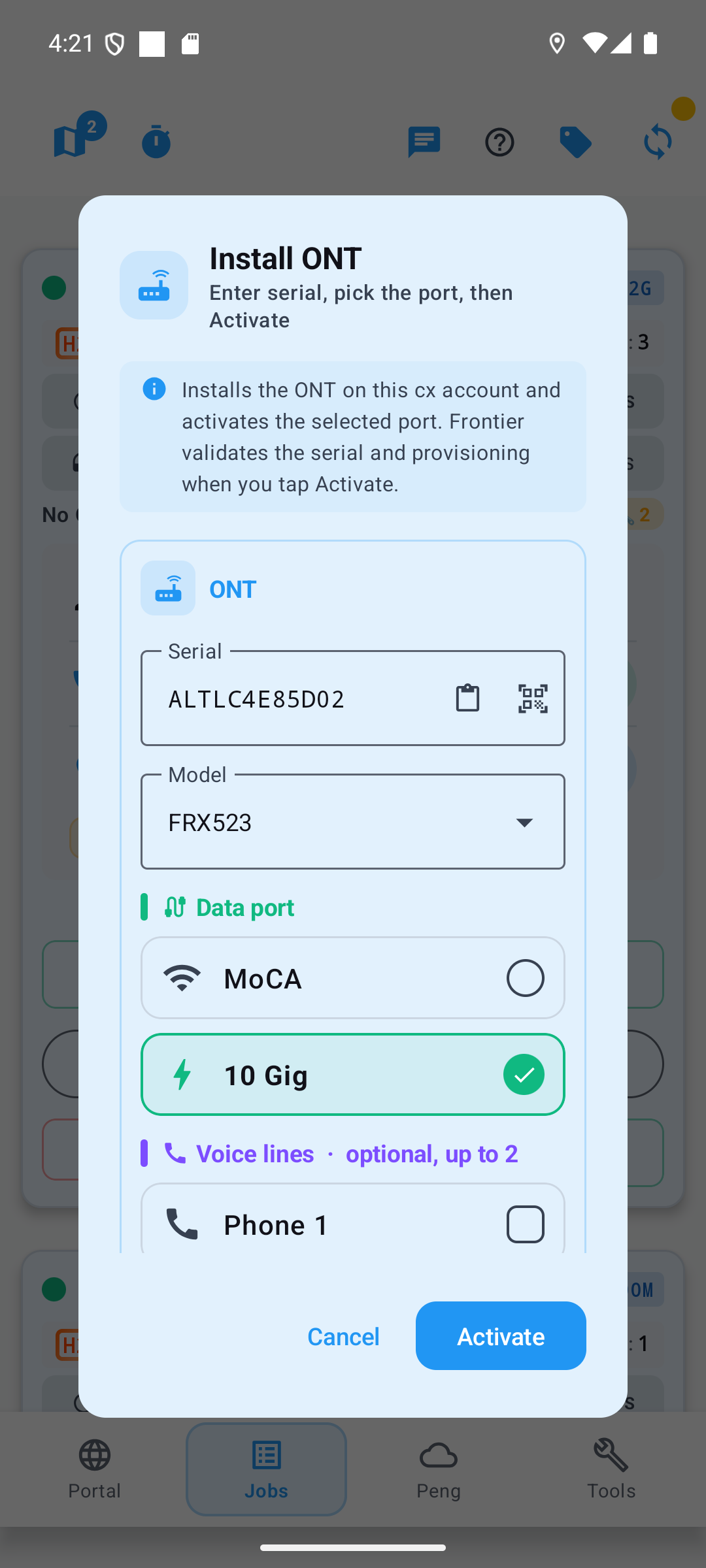
Install, remove, update ports, bounce and TIP — the whole Frontier lifecycle, fully redesigned around the tech.
  • Redesigned for the field — every field that wasn't needed is gone; what's left fits one thumb.
  • Fills itself — serial, model, port arrive from the scanner and the job card automatically. Forget manual copy-paste.
  • Install — serial + model + port, one tap to activate.
  • Remove · Update · Bounce · TIP from one menu.
InstallUpdate PortsBounce · TIPauto-filled
Customer ETA Portal

Customers
always know when.

A link they open with no app install — premium live-map graphics and full transparency for both sides. The four-hour window is over.

  • Live tracking — position and route to the door, wherever the customer is. They can be a thousand miles away and still know exactly what's happening.
  • Privacy fog — the server hides the tech's starting point in a 500-ft cloud that only dissipates once they drive out of it. Your home — or the previous customer — stays private.
  • Every step reported — went to the hub? Installing equipment? The customer sees each status change live.
  • Suspended = paused — tracking stops with the job and resumes only on the next Tech En Route.
  • Auto call · SMS · review — the system dials the customer, texts the link on approval, and asks for the review when the job completes.
no app needed500-ft privacy fogSMS trackingpremium graphics
Reviews
Reviews
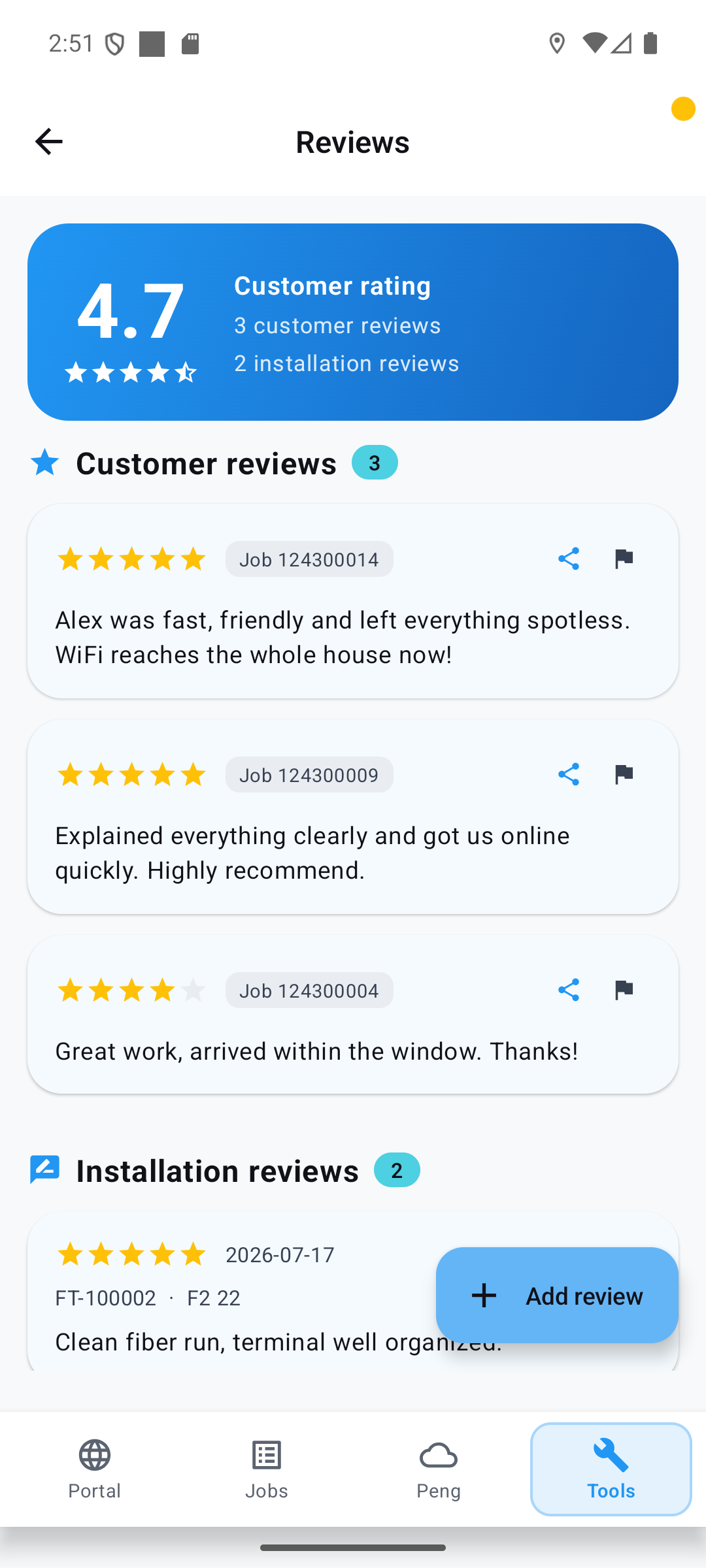
4.7

Better with
every review.

Hand the customer a link — they tell you exactly where you could be better. Every new review makes you a better tech.

  • Photos & details — customers attach pictures and extra context right in the review.
  • Export to brag — pull your reviews out any time you want to show them off.
  • Rate the work itself — flag a hub where the splitter is impossible to find, or praise whoever left it clean. Peers see it before they roll.
4.7 averagecustomer + installphoto reviewsexportable
Live Map · Gamified

Ever dreamed of
being the hero?

The hero of your own game — clearing the fog of war, exploring territory no one's mapped, racing other techs for coverage, collecting achievements. The dream shipped. Welcome to the game. And more game elements are on the way — you're going to like this.

  • Out of equipment? Don't even bother your manager — your colleagues are right there on the map. Tap one: phone, chat, and their exact spot with one-tap navigation to it.
  • Technogram — notes from other techs. A bear roaming the block? A rabid squirrel by the pedestal? You'll know before you park.
  • Proximity alerts — someone saved the gate code for a closed community; it pops up automatically as you roll up to the gate.
fog of warlive teamcoverage raceachievementstechnogramproximity alerts
⌖ this map is live — drag it
The numbers that matter

Three winners. Every job.

Every feature lands as a number someone can count — the tech, the customer, or the company.

For the tech
0
handed back every single shift — no more hunting, typing or paperwork.
  • +$37k/yr of earning time reclaimed
  • One app instead of five portals
  • Routine automated — play on a new level
For the customer
0
★ average rated experience — and it climbs with every review.
  • Zero phone calls — live map link by SMS
  • Every status visible from 1,000 miles away
  • Spoken to in their own language
For the company
0
stops leaking from a 500-tech fleet — the lost hour, priced.
  • Fewer truck rolls — same-hub jobs batched
  • Cancellations rescued by live translation
  • Every job documented — photos, maps, proof
The vision

One tech today.
An entire industry tomorrow.

It starts with one perfect workday — and ends with telecom running as one precise, automated system.

Today · shipped
One tech's perfect day

Locate · scan · activate · track · file · get paid — one app, in production, on real jobs.

The goal
The industry, orchestrated

Telecom as a precision industry — every element knowing its place, every job flowing to the right hands, building the network a whole country runs on.

Make the call

Put the field on autopilot.

Without BlinkSnapper

  • Circling blocks for terminals
  • Serials typed by hand — was that an O or a 0?
  • Job codes that make your head explode
  • No idea what you've earned — today, this week or this month

With BlinkSnapper

  • Fiber found in seconds
  • Scan once, activated
  • Third-party billing filled like magic
  • Every dollar counted — day, week, month, year
Live on Google Play today · partnerships & pilots — one click away · news in the open Telegram lobby.

Partner with us

Pilots, fleets, integrations — tell us a little and we'll get back fast.
Couldn't send right now — please try again in a minute.
Send →

Got it — talk soon.

Your message is on its way to the partnerships team.